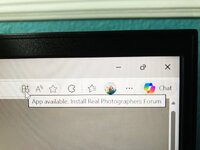
I didn't want to click on an unknown link to put something on my machine that was possibly questionable.
I have never encountered a web page suggesting an app for something that is clearly driven by html.
@Gary R. Smith: I don't use Microsoft Edge, but did a little research about this 'app' thing, and this is what I found.
What you're seeing in Microsoft Edge is perfectly normal. When Edge determines that a website is an installable Progressive Web App (PWA), the "App available" icon appears in the Address bar.
Progressive Web Apps are applications built using web technologies that can be installed and run on all devices, Edge is letting you know that you can install the Real Photographers Forum as if it were a regular Windows app. If you install it, the forum would:
- Open in its own window (without browser toolbars)
- Appear in your Start menu
- Show up in your taskbar like other apps
- Work like a native Windows application
It's a convenience feature - it won't change how the website works, just how you access it. If you prefer using a regular browser tab, you can simply ignore the icon.
Here's the official Microsoft documentation:
https://learn.microsoft.com/en-us/microsoft-edge/progressive-web-apps/ux
This page explains all about how PWAs work in Edge and how to install/manage them if you're interested.
And here's an 'Overview of Progressive Web Apps (PWAs)':
https://learn.microsoft.com/en-us/microsoft-edge/progressive-web-apps/